
214 lines
14 KiB
XML
214 lines
14 KiB
XML

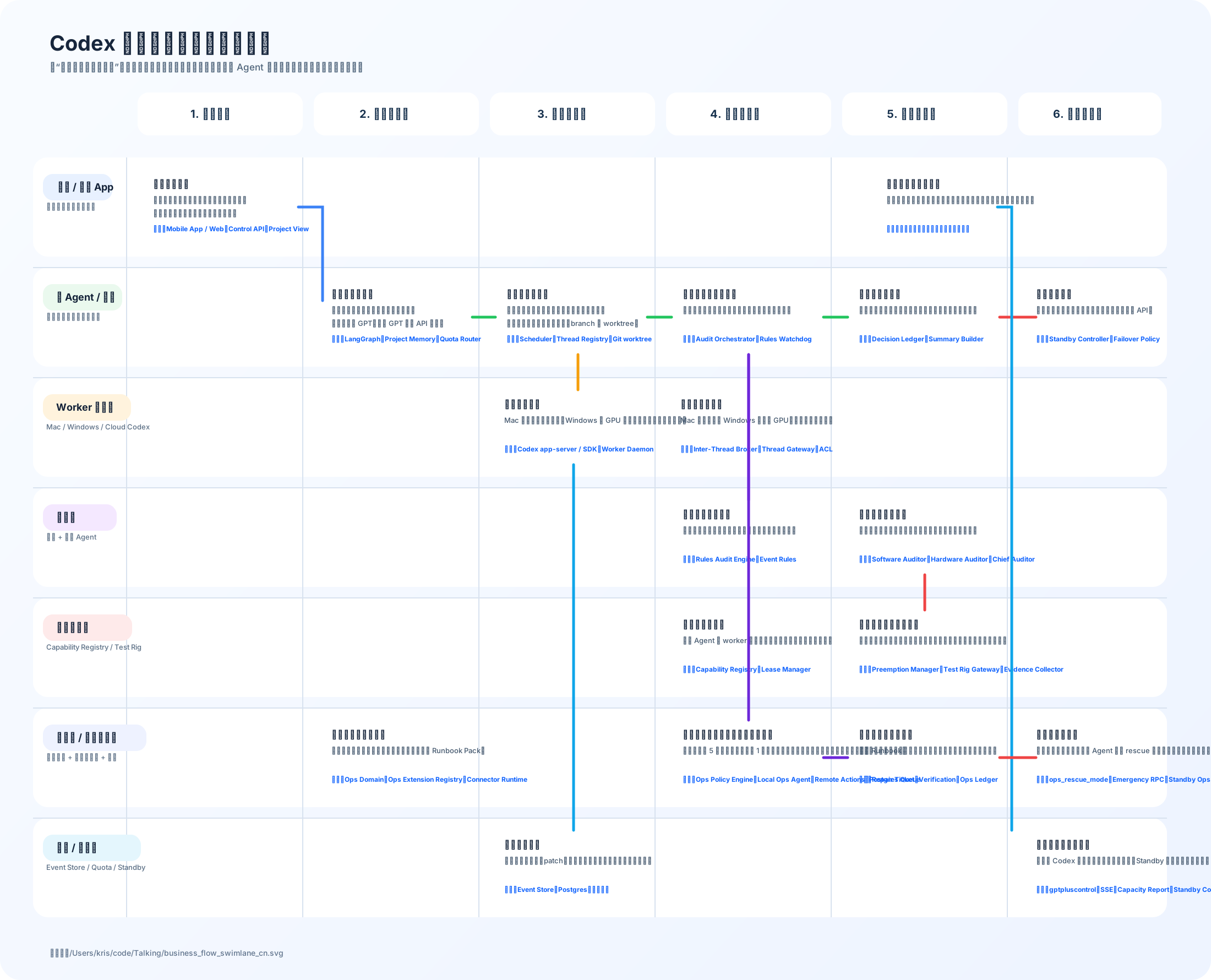


<svg width="2200" height="1780" viewBox="0 0 2200 1780" fill="none" xmlns="http://www.w3.org/2000/svg">
|
||
<defs>
|
||
<linearGradient id="bg" x1="180" y1="40" x2="2020" y2="1740" gradientUnits="userSpaceOnUse">
|
||
<stop stop-color="#F8FBFF"/>
|
||
<stop offset="1" stop-color="#EEF4FF"/>
|
||
</linearGradient>
|
||
<filter id="shadow" x="0" y="0" width="2200" height="1780" filterUnits="userSpaceOnUse" color-interpolation-filters="sRGB">
|
||
<feDropShadow dx="0" dy="16" stdDeviation="18" flood-color="#1F2937" flood-opacity="0.10"/>
|
||
</filter>
|
||
<style>
|
||
.title { font: 700 38px -apple-system, BlinkMacSystemFont, "Segoe UI", "PingFang SC", "Microsoft YaHei", sans-serif; fill: #17263C; }
|
||
.subtitle { font: 500 17px -apple-system, BlinkMacSystemFont, "Segoe UI", "PingFang SC", "Microsoft YaHei", sans-serif; fill: #4F647A; }
|
||
.stage { font: 700 20px -apple-system, BlinkMacSystemFont, "Segoe UI", "PingFang SC", "Microsoft YaHei", sans-serif; fill: #17314D; }
|
||
.lane { font: 700 18px -apple-system, BlinkMacSystemFont, "Segoe UI", "PingFang SC", "Microsoft YaHei", sans-serif; fill: #132238; }
|
||
.laneSub { font: 500 13px -apple-system, BlinkMacSystemFont, "Segoe UI", "PingFang SC", "Microsoft YaHei", sans-serif; fill: #5A6E84; }
|
||
.cardTitle { font: 700 16px -apple-system, BlinkMacSystemFont, "Segoe UI", "PingFang SC", "Microsoft YaHei", sans-serif; fill: #132238; }
|
||
.cardText { font: 500 13px -apple-system, BlinkMacSystemFont, "Segoe UI", "PingFang SC", "Microsoft YaHei", sans-serif; fill: #43576D; }
|
||
.tech { font: 700 12px -apple-system, BlinkMacSystemFont, "Segoe UI", "PingFang SC", "Microsoft YaHei", sans-serif; fill: #0F62FE; }
|
||
.footer { font: 500 14px -apple-system, BlinkMacSystemFont, "Segoe UI", "PingFang SC", "Microsoft YaHei", sans-serif; fill: #60748C; }
|
||
</style>
|
||
</defs>
|
||
|
||
<rect width="2200" height="1780" rx="36" fill="url(#bg)"/>
|
||
<text x="90" y="92" class="title">Codex 多机协作业务流程泳道图</text>
|
||
<text x="90" y="128" class="subtitle">把“谁在什么时候做什么”拆开,并把主运维层、开放式运维接入、主 Agent 反向抢救运维层一起纳入业务流程。</text>
|
||
|
||
<g filter="url(#shadow)">
|
||
<rect x="250" y="168" width="300" height="78" rx="20" fill="#FFFFFF"/>
|
||
<rect x="570" y="168" width="300" height="78" rx="20" fill="#FFFFFF"/>
|
||
<rect x="890" y="168" width="300" height="78" rx="20" fill="#FFFFFF"/>
|
||
<rect x="1210" y="168" width="300" height="78" rx="20" fill="#FFFFFF"/>
|
||
<rect x="1530" y="168" width="300" height="78" rx="20" fill="#FFFFFF"/>
|
||
<rect x="1850" y="168" width="260" height="78" rx="20" fill="#FFFFFF"/>
|
||
</g>
|
||
<text x="346" y="214" class="stage">1. 立项进入</text>
|
||
<text x="653" y="214" class="stage">2. 规划与派发</text>
|
||
<text x="976" y="214" class="stage">3. 执行与协作</text>
|
||
<text x="1290" y="214" class="stage">4. 审计与测试</text>
|
||
<text x="1611" y="214" class="stage">5. 汇总与交付</text>
|
||
<text x="1913" y="214" class="stage">6. 异常与恢复</text>
|
||
|
||
<g opacity="0.97">
|
||
<rect x="60" y="286" width="2060" height="180" rx="26" fill="#FFFFFF"/>
|
||
<rect x="60" y="486" width="2060" height="180" rx="26" fill="#FFFFFF"/>
|
||
<rect x="60" y="686" width="2060" height="180" rx="26" fill="#FFFFFF"/>
|
||
<rect x="60" y="886" width="2060" height="180" rx="26" fill="#FFFFFF"/>
|
||
<rect x="60" y="1086" width="2060" height="180" rx="26" fill="#FFFFFF"/>
|
||
<rect x="60" y="1286" width="2060" height="180" rx="26" fill="#FFFFFF"/>
|
||
<rect x="60" y="1486" width="2060" height="180" rx="26" fill="#FFFFFF"/>
|
||
</g>
|
||
|
||
<g stroke="#D8E2EF" stroke-width="2">
|
||
<line x1="230" y1="286" x2="230" y2="1666"/>
|
||
<line x1="550" y1="286" x2="550" y2="1666"/>
|
||
<line x1="870" y1="286" x2="870" y2="1666"/>
|
||
<line x1="1190" y1="286" x2="1190" y2="1666"/>
|
||
<line x1="1510" y1="286" x2="1510" y2="1666"/>
|
||
<line x1="1830" y1="286" x2="1830" y2="1666"/>
|
||
<line x1="60" y1="486" x2="2120" y2="486"/>
|
||
<line x1="60" y1="686" x2="2120" y2="686"/>
|
||
<line x1="60" y1="886" x2="2120" y2="886"/>
|
||
<line x1="60" y1="1086" x2="2120" y2="1086"/>
|
||
<line x1="60" y1="1286" x2="2120" y2="1286"/>
|
||
<line x1="60" y1="1486" x2="2120" y2="1486"/>
|
||
</g>
|
||
|
||
<rect x="78" y="316" width="126" height="48" rx="18" fill="#E8F1FF"/>
|
||
<text x="104" y="346" class="lane">用户 / 手机 App</text>
|
||
<text x="84" y="380" class="laneSub">你看到的产品流程入口</text>
|
||
|
||
<rect x="78" y="516" width="144" height="48" rx="18" fill="#EAF9EE"/>
|
||
<text x="102" y="546" class="lane">主 Agent / 主控</text>
|
||
<text x="84" y="580" class="laneSub">决策、拆解、调度、回收</text>
|
||
|
||
<rect x="78" y="716" width="160" height="48" rx="18" fill="#FFF3DD"/>
|
||
<text x="102" y="746" class="lane">Worker 执行层</text>
|
||
<text x="84" y="780" class="laneSub">Mac / Windows / Cloud Codex</text>
|
||
|
||
<rect x="78" y="916" width="134" height="48" rx="18" fill="#F4E8FF"/>
|
||
<text x="102" y="946" class="lane">审计层</text>
|
||
<text x="84" y="980" class="laneSub">规则 + 专项 Agent</text>
|
||
|
||
<rect x="78" y="1116" width="162" height="48" rx="18" fill="#FEEAEA"/>
|
||
<text x="102" y="1146" class="lane">硬件能力层</text>
|
||
<text x="84" y="1180" class="laneSub">Capability Registry / Test Rig</text>
|
||
|
||
<rect x="78" y="1316" width="188" height="48" rx="18" fill="#EEF2FF"/>
|
||
<text x="102" y="1346" class="lane">运维层 / 运维审计层</text>
|
||
<text x="84" y="1380" class="laneSub">主运维层 + 开放式接入 + 抢修</text>
|
||
|
||
<rect x="78" y="1516" width="178" height="48" rx="18" fill="#E4F6FD"/>
|
||
<text x="102" y="1546" class="lane">数据 / 容灾层</text>
|
||
<text x="84" y="1580" class="laneSub">Event Store / Quota / Standby</text>
|
||
|
||
<g filter="url(#shadow)">
|
||
<rect x="258" y="308" width="284" height="136" rx="20" fill="#FFFFFF"/>
|
||
<rect x="1590" y="308" width="224" height="136" rx="20" fill="#FFFFFF"/>
|
||
<rect x="582" y="508" width="276" height="136" rx="20" fill="#FFFFFF"/>
|
||
<rect x="900" y="508" width="276" height="136" rx="20" fill="#FFFFFF"/>
|
||
<rect x="1220" y="508" width="276" height="136" rx="20" fill="#FFFFFF"/>
|
||
<rect x="1540" y="508" width="276" height="136" rx="20" fill="#FFFFFF"/>
|
||
<rect x="1862" y="508" width="232" height="136" rx="20" fill="#FFFFFF"/>
|
||
<rect x="896" y="708" width="292" height="136" rx="20" fill="#FFFFFF"/>
|
||
<rect x="1216" y="708" width="292" height="136" rx="20" fill="#FFFFFF"/>
|
||
<rect x="1220" y="908" width="276" height="136" rx="20" fill="#FFFFFF"/>
|
||
<rect x="1540" y="908" width="276" height="136" rx="20" fill="#FFFFFF"/>
|
||
<rect x="1220" y="1108" width="276" height="136" rx="20" fill="#FFFFFF"/>
|
||
<rect x="1540" y="1108" width="276" height="136" rx="20" fill="#FFFFFF"/>
|
||
<rect x="582" y="1308" width="276" height="136" rx="20" fill="#FFFFFF"/>
|
||
<rect x="1220" y="1308" width="276" height="136" rx="20" fill="#FFFFFF"/>
|
||
<rect x="1540" y="1308" width="276" height="136" rx="20" fill="#FFFFFF"/>
|
||
<rect x="1862" y="1308" width="232" height="136" rx="20" fill="#FFFFFF"/>
|
||
<rect x="896" y="1508" width="292" height="136" rx="20" fill="#FFFFFF"/>
|
||
<rect x="1862" y="1508" width="232" height="136" rx="20" fill="#FFFFFF"/>
|
||
</g>
|
||
|
||
<text x="278" y="340" class="cardTitle">发起项目需求</text>
|
||
<text x="278" y="368" class="cardText">输入目标、优先级、设备条件、交付标准。</text>
|
||
<text x="278" y="392" class="cardText">系统生成项目页,不再只是一串聊天。</text>
|
||
<text x="278" y="420" class="tech">技术:Mobile App / Web、Control API、Project View</text>
|
||
|
||
<text x="1610" y="340" class="cardTitle">查看结果与继续追问</text>
|
||
<text x="1610" y="368" class="cardText">看阶段成果、风险、审计结论、运维告警,再继续给主会话下指令。</text>
|
||
<text x="1610" y="420" class="tech">技术:项目页、线程页、时间线、通知中心</text>
|
||
|
||
<text x="602" y="540" class="cardTitle">项目结构化建模</text>
|
||
<text x="602" y="568" class="cardText">整理目标、里程碑、风险、待确认项。</text>
|
||
<text x="602" y="592" class="cardText">决定使用主 GPT、备用 GPT 还是 API 容灾。</text>
|
||
<text x="602" y="620" class="tech">技术:LangGraph、Project Memory、Quota Router</text>
|
||
|
||
<text x="920" y="540" class="cardTitle">任务拆解与派发</text>
|
||
<text x="920" y="568" class="cardText">按平台、算力、上下文体积拆成多个短任务。</text>
|
||
<text x="920" y="592" class="cardText">为每个任务挑选节点、账号、branch 与 worktree。</text>
|
||
<text x="920" y="620" class="tech">技术:Scheduler、Thread Registry、Git worktree</text>
|
||
|
||
<text x="1240" y="540" class="cardTitle">监管执行与审计触发</text>
|
||
<text x="1240" y="568" class="cardText">盯线程推进,必要时发起审计、重派或人工确认。</text>
|
||
<text x="1240" y="620" class="tech">技术:Audit Orchestrator、Rules Watchdog</text>
|
||
|
||
<text x="1560" y="540" class="cardTitle">汇总与阶段交付</text>
|
||
<text x="1560" y="568" class="cardText">归并子线程结果、审计结论、运维状态和下一步建议。</text>
|
||
<text x="1560" y="620" class="tech">技术:Decision Ledger、Summary Builder</text>
|
||
|
||
<text x="1882" y="540" class="cardTitle">主控异常切换</text>
|
||
<text x="1882" y="568" class="cardText">主账号或主控异常时切备用主控、备用账号或 API。</text>
|
||
<text x="1882" y="620" class="tech">技术:Standby Controller、Failover Policy</text>
|
||
|
||
<text x="916" y="740" class="cardTitle">多机并行开发</text>
|
||
<text x="916" y="768" class="cardText">Mac 做前端和本地联调,Windows 跑 GPU 或硬件桥接,云端跑长任务。</text>
|
||
<text x="916" y="820" class="tech">技术:Codex app-server / SDK、Worker Daemon</text>
|
||
|
||
<text x="1236" y="740" class="cardTitle">跨节点线程协作</text>
|
||
<text x="1236" y="768" class="cardText">Mac 线程可请求 Windows 线程做 GPU、硬件或平台验证。</text>
|
||
<text x="1236" y="820" class="tech">技术:Inter-Thread Broker、Thread Gateway、ACL</text>
|
||
|
||
<text x="1240" y="940" class="cardTitle">规则审计先筛异常</text>
|
||
<text x="1240" y="968" class="cardText">看超时、失败、断流、额度、反复压缩和卡住状态。</text>
|
||
<text x="1240" y="1020" class="tech">技术:Rules Audit Engine、Event Rules</text>
|
||
|
||
<text x="1560" y="940" class="cardTitle">专项审计与总审计</text>
|
||
<text x="1560" y="968" class="cardText">软件、硬件、多模态各自复核,再由总审计给出结论。</text>
|
||
<text x="1560" y="1020" class="tech">技术:Software Auditor、Hardware Auditor、Chief Auditor</text>
|
||
|
||
<text x="1240" y="1140" class="cardTitle">能力申请与租约</text>
|
||
<text x="1240" y="1168" class="cardText">审计 Agent 或 worker 先申请摄像头、串口、机器人等能力。</text>
|
||
<text x="1240" y="1220" class="tech">技术:Capability Registry、Lease Manager</text>
|
||
|
||
<text x="1560" y="1140" class="cardTitle">抢占、执行、证据回传</text>
|
||
<text x="1560" y="1168" class="cardText">按优先级抢占,执行测试动作,回传视频、音频、日志和检测结果。</text>
|
||
<text x="1560" y="1220" class="tech">技术:Preemption Manager、Test Rig Gateway、Evidence Collector</text>
|
||
|
||
<text x="602" y="1340" class="cardTitle">开放式主运维层接入</text>
|
||
<text x="602" y="1368" class="cardText">为其他项目注册运维域、连接器、健康探针和 Runbook Pack。</text>
|
||
<text x="602" y="1420" class="tech">技术:Ops Domain、Ops Extension Registry、Connector Runtime</text>
|
||
|
||
<text x="1240" y="1340" class="cardTitle">动态巡检、跨设备运维与修复授权</text>
|
||
<text x="1240" y="1368" class="cardText">高频使用时 5 分钟巡检,空闲时 1 小时;还能跨设备拉日志、重启服务、切账号、跑 Runbook。</text>
|
||
<text x="1240" y="1420" class="tech">技术:Ops Policy Engine、Local Ops Agent、Remote Actions、Postgres Queue</text>
|
||
|
||
<text x="1560" y="1340" class="cardTitle">运维修复复验与汇报</text>
|
||
<text x="1560" y="1368" class="cardText">修复后先由运维审计层复验,再把结论和剩余风险报告主会话。</text>
|
||
<text x="1560" y="1420" class="tech">技术:Repair Ticket、Verification、Ops Ledger</text>
|
||
|
||
<text x="1882" y="1340" class="cardTitle">反向抢救运维层</text>
|
||
<text x="1882" y="1368" class="cardText">如果运维层自己挂了,主 Agent 切到 rescue 模式,走最小救援通道恢复运维层。</text>
|
||
<text x="1882" y="1420" class="tech">技术:ops_rescue_mode、Emergency RPC、Standby Ops</text>
|
||
|
||
<text x="916" y="1540" class="cardTitle">全量事件镜像</text>
|
||
<text x="916" y="1568" class="cardText">线程消息、命令、patch、审批、协作、告警和修复工单都落库。</text>
|
||
<text x="916" y="1620" class="tech">技术:Event Store、Postgres、对象存储</text>
|
||
|
||
<text x="1882" y="1540" class="cardTitle">额度与容灾健康矩阵</text>
|
||
<text x="1882" y="1568" class="cardText">监控各 Codex 节点剩余额度、切换记录、Standby 状态与运维健康矩阵。</text>
|
||
<text x="1882" y="1620" class="tech">技术:gptpluscontrol、SSE、Capacity Report、Standby Controller</text>
|
||
|
||
<g stroke-linecap="round" stroke-width="5">
|
||
<path d="M542 376H586V546" stroke="#3B82F6"/>
|
||
<path d="M858 576H900" stroke="#22C55E"/>
|
||
<path d="M1176 576H1220" stroke="#22C55E"/>
|
||
<path d="M1496 576H1540" stroke="#22C55E"/>
|
||
<path d="M1816 576H1882" stroke="#EF4444"/>
|
||
<path d="M1050 644V708" stroke="#F59E0B"/>
|
||
<path d="M1360 644V908" stroke="#A855F7"/>
|
||
<path d="M1680 1044V1108" stroke="#EF4444"/>
|
||
<path d="M1042 844V1508" stroke="#0EA5E9"/>
|
||
<path d="M1360 644V1308" stroke="#6D28D9"/>
|
||
<path d="M1812 376H1838V1508" stroke="#0EA5E9"/>
|
||
<path d="M1496 1376H1540" stroke="#6D28D9"/>
|
||
<path d="M1816 1376H1882" stroke="#EF4444"/>
|
||
</g>
|
||
|
||
<text x="90" y="1736" class="footer">图文件:/Users/kris/code/Talking/business_flow_swimlane_cn.svg</text>
|
||
</svg>
|
